Not Every Broken Link Is Broken: What's New in Check My Links 8.2.3
Every link checker has the same dirty secret: a lot of the “broken” links it reports are not broken at all.
LinkedIn answers automated checks with a 999. Cloudflare-protected sites send a bot challenge. Busy servers reply “too many requests”. Login pages say 401. Open any of these links in your browser and they work fine, but your report still turns them red.
Check My Links 8.2.3 and 8.2.2 fix that, and make the whole report far more useful. Here is what’s new.
1. Blocked links get their own group
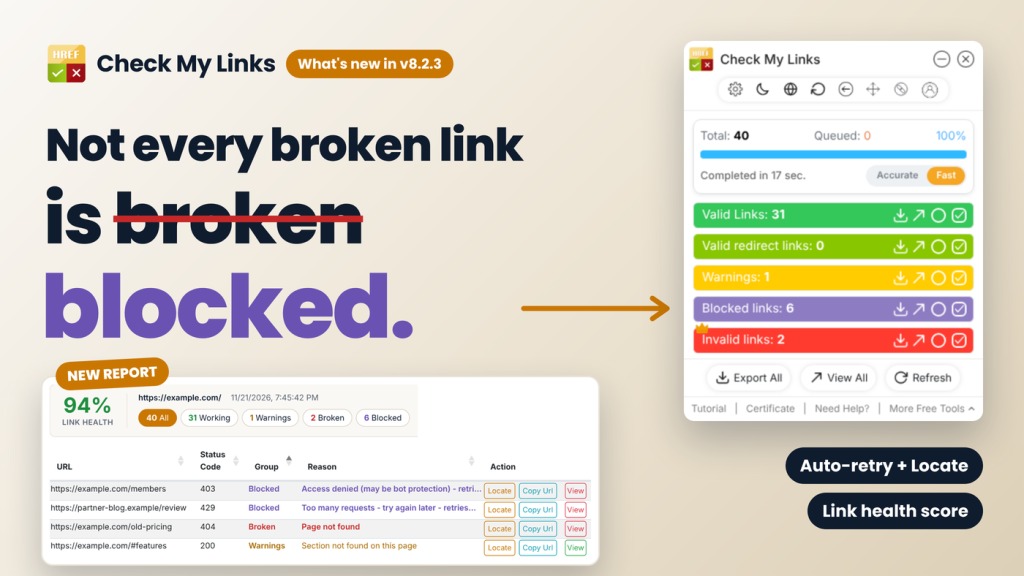
Links that a site refused to let us check now land in a new purple Blocked links row instead of the red Invalid row. That covers 401 (login required), 403 (access denied), 429 (too many requests), 999 (LinkedIn-style blocks) and Cloudflare-style bot challenges.
Before giving up, Check My Links retries them automatically:
- Rate limited (429): up to two retries, honouring the site’s own Retry-After time.
- Access denied, 999 or bot challenge: one retry after a short pause.
- Temporary server errors (502, 503, 504) or a dropped connection: one retry, so a server hiccup does not show up as broken.
Your Invalid count now means what it says: links that are really broken. Blocked links stay one click away, and “Fetch All HTTPS Status Code” verifies them in a real browser window.
2. Every failure comes with a reason
A bare “0” or “404” tells you something went wrong, not what. Each link now carries a plain-English reason: Domain not found, SSL certificate problem, Connection refused, Timed out, Page permanently removed, Server error and more.
Redirects show the real story too. Instead of a flat “300”, you see the actual code (301, 302, 307, 308), the full chain such as 302 → 301 → 200, and the final URL. A redirect that ends on a 404 is now counted as broken, not as a valid redirect.
3. A report you can actually work from
The View All report has been rebuilt around one question: what do I fix first?
- Link health score. A summary header shows the page URL, the scan date and a health score: working links out of all links checked. Blocked links are left out, because the site never let us check them.
- One-click filters. All, Working, Warnings, Broken and Blocked buttons filter the table instantly.
- Locate on page. Every row has a Locate button. Click it and Check My Links jumps back to the page, scrolls to that exact link and outlines it in amber. No more hunting through a long page for one bad URL.
- Richer columns. Group, Reason, full link text (or image alt text), final URL, redirect chain, response time, internal or external, page section (header, nav, content, sidebar, footer), times on page and XPath.
The same columns go into your CSV and Excel downloads, and the CSV now opens cleanly in Excel with non-English link text.
4. Faster scans that are gentler on servers
Three changes under the hood make scans quicker without hammering the sites you check:
- One check per URL. A link that appears 30 times on a page is now checked once, and every copy gets the result.
- Headers only. Check My Links stops as soon as it has the status code, instead of downloading the whole page, PDF or video behind the link.
- Per-website limits. Accurate mode checks at most 2 links at a time on any one site, Fast mode at most 4. If a site starts rate limiting, Check My Links slows down to one link at a time for that site only, while other sites carry on.
Your Accurate and Fast modes and batch settings work exactly as before; the limits sit underneath them.
5. Smaller things you will notice
- #section links are checked on the page itself. Links like “#pricing” are verified against the current page with no network request. If the section does not exist, the link is flagged as a warning. App routes such as “#/home” are left alone.
- Fresh results. Saved results are reused for 24 hours at most, so a link you fixed yesterday no longer shows as broken today.
- Close means close. Clicking the close button now stops the whole scan straight away, and the panel never reopens on its own. A scan starts only when you click the Check My Links icon.
- 12 languages. Every new label and reason is translated, from Japanese to Hindi.
Try it today
If you already use Check My Links, the update installs automatically. New here? Add it free from the [Chrome Web Store]([CHROME STORE LINK]) or [Microsoft Edge Add-ons]([EDGE ADD-ONS LINK]), open any page and click the icon. It also works inside Google Docs and Google Sheets.
Check My Links is part of SelectorsHub, built for testers, by a tester. If a link shows up in the wrong group, or there is a report column you wish you had, tell me in the comments. Most of this release started as user feedback.
Recent Post