The Bug Report That Writes Itself (No AI Needed)
Every tester knows the moment. You find a real bug, and then the second job begins: retracing your steps, taking screenshots, noting the browser and screen size, opening DevTools to check what failed, and typing it all into Jira in a way a developer will actually read. Business analysts know a version of it too, when the same flow has to become a user guide, a UAT checklist or acceptance criteria.
TestCase Studio already records every step you take in plain English, with a screenshot for each one. This update puts that recording to work. From the same recording, you can now file a complete bug report in one click, see exactly which step broke the page, and export ready-made documents for your team.
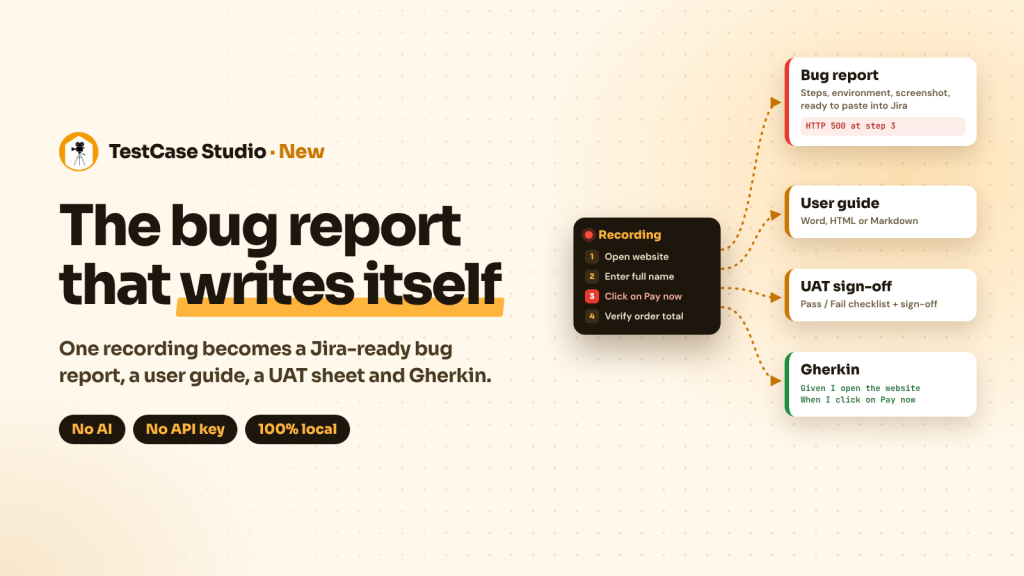
Here’s what’s new.
1. A complete bug report in one click
Click Bug Report, pick the step where things went wrong, and the report is written for you:
- A clear title, such as “HTTP 500 at step 3 on yourapp.com: Click on Pay now”
- Numbered steps to reproduce, up to the failing step
- The URL, OS, browser and screen resolution
- Expected and actual results, pre-filled from your recording and fully editable
- Severity, and the screenshot of the failing step (or every step, if you prefer)
- Any errors the page threw along the way
The report is plain text that reads like a person wrote it, so it pastes cleanly into Jira, Azure DevOps, email or Slack. You can also download it as an HTML page with the screenshots embedded, or as a ZIP with the report and every screenshot.
2. Errors caught at the exact step that caused them
While you record, TestCase Studio quietly listens for the errors you’d normally dig out of DevTools: JavaScript errors, failed API calls (any 4xx or 5xx response), and images, scripts or stylesheets that fail to load. Each one is pinned to the step that triggered it.
A small red counter appears under that step’s number. Hover it to see what went wrong, or click it to open a bug report with that step already selected.
We were careful about noise. A marker that lights up for every ad pixel and analytics tag soon gets ignored, so TestCase Studio only flags errors from the site you are testing. Third-party trackers, ads, tag managers, embedded widgets and harmless browser warnings are left out. When the marker appears, it’s worth a look.
3. One recording, four documents
The new Docs button turns the same recording into the documents testers and BAs write by hand every week:
|
Document |
What you get |
Formats |
|---|---|---|
|
User guide |
Numbered steps with a screenshot under each one, for training notes, SOPs and how-to pages |
Word, HTML (print to PDF), Markdown |
|
UAT sign-off sheet |
A checklist with Pass/Fail and Comments columns, plus a sign-off block for the business owner |
Word, HTML |
|
Test case document |
Steps, test data, expected and actual results in one table |
Word, Markdown |
|
Gherkin scenario |
Given / When / Then built from your steps and expected results |
.feature file |
Record the flow once, and the guide, the sign-off sheet and the BDD scenario all come from it. Edit a step in the grid before exporting, and every document picks up the change.
Why we built this without AI
It would have been easy to put an AI model behind these features. We chose not to, on purpose.
- Your data stays on your machine. Recordings, screenshots and errors never leave the browser. That matters when you test banking, healthcare or internal apps.
- It works on every laptop. No API key, no account, no GPU, no large model download. It works offline too.
- The same recording gives the same document every time. Nothing is invented or guessed, so what lands in Jira is exactly what happened.
- No new permissions. The update installs quietly, with no extra access requested.
AI has a real place in testing, and we’re exploring it. But the everyday work of reporting bugs and writing docs should be fast, free and private for every tester, everywhere.
Try it today
TestCase Studio is available for Chrome and Edge. If you already have it installed, the update arrives on its own.
Record your next test, click Bug Report or Docs, and see how much time you get back. Then tell me what you’d like next. Built for testers, by a tester.
Sanjay Kumar, Founder of SelectorsHub
Recent Post